Town Square
Casual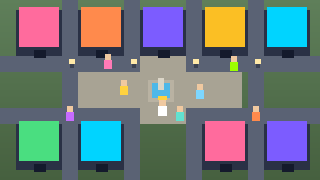
Town Square is a shared voxel plaza where every building is one of Gomini’s games. Walk around with whoever else is online, wave at the locals, pick a name and a colour, and step through a shop door to play. It is a town, not a text menu — the plaza is the lobby.
▶ Play now — freeWalk with WASD or the arrow keys; on mobile use the touch stick. Stand at a door and press E to enter that game. F waves. Choose your name and colour when you arrive. Other players in the plaza are live; you are not wandering a static screenshot.
Wave first; it is how you notice someone is actually there. If a shop feels busy, duck into a quieter door and loop back. On a phone, keep the stick small and tap E only when the door highlight is solid, or you will stroll past the entrance.
Social-curious players, kids exploring a friendly hub, and anyone who wants a spatial way to browse Gomini games will like the square. The multiplayer piece described is presence in the plaza — walking and waving with others who are online — then entering doors to individual games. Do not read that as a promise that every doorway game is itself multiplayer.
Because the town is a hub, your “session” can be as short as a wave and a door, or a longer stroll between shops. Name and colour are your lightweight identity; there is no heavy RPG layer claimed in the source description. Treat doors as portals into the catalog you came to play.
Visit Town Square free in the browser on Gomini when you want a voxel social hub that routes you into games by walking through shopfronts.
FAQ
- How do I move and enter games?
- WASD or arrows walk (touch stick on mobile). Press E at a door to play that game.
- How do I wave?
- Press F to wave at others in the plaza.
- Can other people see me?
- Yes. Other players in the plaza are live when they are online.
- What do I pick when I arrive?
- Choose a name and a colour; then explore doors that lead into Gomini games.